
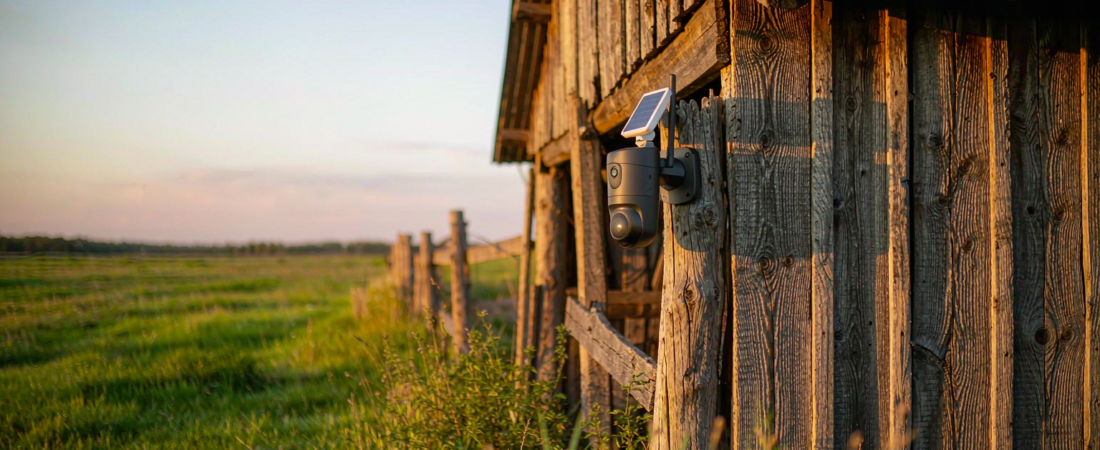
A solar security camera for farm sites is a battery-powered camera that charges itself from its own small solar panel, so a barn, shed, gate or fence line with no mains wiring still gets day-and-night coverage. It records to storage you own — a memory card inside the camera or a recorder inside a building — instead of pushing every clip to a paid cloud plan.
That combination is what makes these cameras practical in places where a cable run was never going to happen. There is no socket in the barn, no router on the far fence line, and no appetite for trenching power and network cable across a working yard. A panel the size of a tablet, a battery that stores the afternoon’s charge, and local recording solve the whole problem at once.
This guide walks through how solar power actually holds up through winter, where to mount a camera on a farm property, what storage sizing looks like in practice, and what to confirm with a supplier before you buy.
How Does a Solar Security Camera for Farm Sites Stay Powered?
The power chain is simpler than most buyers expect, and each link exists for a reason:
- The solar panel captures light — usually a compact panel mounted on the camera body or on a short bracket. It does not need blazing sun all day; it needs a clear view of the sky for a few hours.
- The battery stores the charge — a lithium cell in the camera keeps the unit alive overnight and through overcast stretches, so the panel never has to power the camera directly.
- Motion detection carries the load — a PIR sensor wakes the camera when a person, animal or vehicle moves through the detection zone. Idle time is what protects the battery, which is why battery cameras record clips rather than endless empty footage.
- Recording happens on local storage — the clip is written to a memory card in the camera or to a recorder inside a building. Nothing has to leave the property for the camera to do its job.
The woCyber F11A-D 4G LTE solar camera is built exactly this way: a rechargeable battery, a solar panel, an IP65 housing, and local recording by default. If you want the site to be reachable from your phone without any Wi-Fi at all, a cellular model in that family adds a data SIM so alerts and live view travel over the mobile network instead of your router.
Which Power Setup Fits Your Outbuilding: Solar, Battery-Only or Mains?
Buyers usually arrive deciding between three real options. The honest comparison looks like this:
| What matters | Solar + battery | Battery only | Mains-powered |
|---|---|---|---|
| Cable run required | None | None | Yes — power, plus network |
| Charging | Self-charging from daylight | You take the camera down to recharge | Continuous |
| Best suited to | Barns, gates, fence lines, yards | Short-term or shaded sites | Buildings with power indoors |
| Main task you own | Keep the panel clear of dust and snow | Recharge cycles every few weeks | Almost none |
If the site has one building with power, a hybrid layout often wins: solar and cellular cameras outdoors where cabling is impossible, and a mains-powered recorder or NAS security kit indoors as the long-term archive for every camera on the property.
Related solution
woCyber Solar & 4G Cameras
Solar charging plus 4G LTE for sites with no mains power and no Wi-Fi — recording to local storage instead of a cloud plan.
How Much Sunlight Does the Panel Really Need?
The question that decides most installs is not whether the sun shines, but where the sun lands. A panel facing a shaded barn wall will underperform no matter how good the camera is.
- Aim the panel south in the northern hemisphere — and tilt it upward rather than flat, so low winter sun still lands on the glass.
- Avoid the tree line you forgot about — a deciduous tree is harmless in February and a problem in July. Check the panel’s sky view in summer leaf, not in winter.
- Consider the whole year, not the day you install — in many farming regions December provides only a fraction of June’s usable daylight, so a site that works comfortably in July is the one to test your assumptions against.
- Keep the glass clean — dust, chaff and snow are the mundane reasons a working camera appears dead. A wipe every few weeks solves it.
Cold also affects batteries: a lithium cell delivering a long run in autumn will deliver shorter runs on a hard frost. Mounting the camera where it takes some shelter — under a barn eave, on the shaded side of a pole rather than in full wind — buys back runtime at no cost. Realistic expectations work in your favour here: an outdoor camera with an IP65 housing, a battery in the 5200mAh class and a sensible panel is designed for exactly this cycle of charge and discharge, not for a permanent mains connection.
Where Should You Mount a Camera on a Farm or Shed?
Placement matters more than resolution on rural sites, because the interesting activity happens across a distance rather than at a doorstep:
- Gates and driveways — the highest-value view on most properties, since every vehicle and visitor passes it.
- Barn doors and feed or fuel storage — the areas that disappear when nobody is watching.
- Equipment yards and machinery parking — mount high enough to need a ladder, and angle across the yard rather than straight down it.
- Fence corners and alleyways — one camera covering the corner often covers two fence lines at once.
- The approach, not the door — a camera that sees people walking toward the shed gives you time to react; a camera pointed at the door gives you a recording of the door opening.
Two practical rules: keep the lens out of direct low sun so the image is not washed out at the exact hours you care about, and check that your coverage points inside your own boundary. Signage and camera angles that respect neighbours are part of a professional install, not an afterthought.
What Storage Do You Need — and Where Should It Live?
Storage planning on a farm is about recording mode first. A battery camera that records motion clips uses a fraction of the space that continuous recording consumes, because it only writes when the PIR sensor sees something. Clear the alert zone of swaying branches and livestock paths, and a 256GB class memory card in the camera holds a solid working history for a busy yard.
If you want a long archive, or a copy that survives a camera being taken off the wall, move the footage indoors. A NAS is a storage device that sits on your own network and keeps recordings on drives you own — the same idea as a memory card, scaled up to several Terabyte of retention, with playback you can search by date instead of by scrolling. That is also where the cost decision is made: local storage is a one-time purchase, while cloud plans bill monthly for as long as you keep the camera.
Buyers who already run a NAS for photos or documents can often point existing cameras at it. If you are starting from nothing, the NAS range covers everything from a single-drive home backup box to multi-bay systems that hold months of high-resolution video.
What Does a Farm Camera Setup Cost Over Three Years?
Compare the two models honestly and the shape of the cost becomes obvious. A cloud-plan camera is a low entry price followed by a monthly fee that renews whether or not anything happened that month. A local-recording camera is a higher one-time price and no recurring storage bill — pay once, own forever.
Three questions sort out any quote you receive:
- Does the storage plan expire? — ask whether the card or drive keeps recording when a subscription lapses.
- What does remote access require? — a 4G model needs a data SIM from a carrier, and that is separate from anything the camera maker charges.
- What is the serviceable life? — panels, brackets and batteries are replaceable parts; a camera family with available spares is worth more over three years than a sealed unit with none.
Because pricing depends on models, mounting hardware and how many cameras a site needs, we quote per project rather than publishing a single number: send the site details and you get a written quote within 24h.
Which Solar Security Camera Should You Choose?
Work through this checklist before you compare model numbers:
- Power margin — a panel larger than the minimum, or a model with a bigger battery, is the single best insurance against a shaded or cloudy site.
- Weather rating — an IP65-rated housing handles rain, dust and hose-downs around livestock; anything less becomes a seasonal replacement.
- Detection quality — PIR heat detection beats pixel-change detection outdoors, where moving grass and shadows would otherwise generate alerts all day.
- Network plan — Wi-Fi if a router reaches the spot, 4G LTE if it does not.
- Storage you control — a card slot for the day-to-day clips, and an option to archive to a NAS indoors.
Two models cover most farm and outbuilding requests, and the deciding difference between them is the network, not the lens:
| Specification | F19A solar battery camera | F11A-D 4G LTE solar camera |
|---|---|---|
| Network | 2.4G / 5.8G dual-band Wi-Fi | 4G LTE — no router needed |
| Resolution | 4MP with colour night vision | 4MP, built as an outdoor trail camera |
| Battery | 5200mAh, charged by its solar panel | 7800mAh, charged by its solar panel |
| Storage & sealing | Local card up to 256GB, IP65 housing | Local card up to 256GB, IP65 housing |
| Best for | Barns and gates where Wi-Fi reaches | Fence lines, fields and sites with no network |
The 4MP solar battery camera handles a sunny barn or gate position with a 5200mAh battery, colour night vision and IP65 sealing. The F11A-D pairs a larger 7800mAh battery with a cellular modem for sites where nothing reaches. Tell us the site conditions and which of the two fits becomes a short conversation rather than a guess.
How long does a solar security camera battery last on a cloudy day?
A camera in the 5200mAh class with PIR-triggered recording is built to ride through several overcast days on stored charge, and the panel tops it back up as soon as light returns. The variables that matter are how many events trigger the camera per day and how sheltered the mounting position is. Sites with heavy traffic, or a panel fighting tree shade, need a bigger battery or a second charge source.
Do I need Wi-Fi for a solar camera on a farm?
No — off-grid sites are exactly why cellular models exist. A 4G LTE camera with a data SIM sends alerts and live view over the mobile network, so you can check a barn from a phone anywhere. If you only need footage reviewed on site, the camera can record to local storage with no network connection at all.
Can I add a farm camera to a NAS I already own?
Often yes, and it is the cheapest way to extend retention. Cameras that support network storage or a recorder protocol can be pointed at a NAS on the property, so clips land on drives you already paid for. Confirm the supported protocol before buying — that single detail decides whether the integration is a ten-minute job or a research project.
Is a solar camera strong enough for a barn in winter?
For motion-triggered recording, yes, with realistic expectations. Short daylight means less charging, and cold reduces battery capacity, so winter is the season to keep the panel clear and to avoid adding unnecessary triggers. If your winter requires continuous 24/7 recording, plan on mains power with a recorder indoors rather than relying on a battery camera.
Cameras for Sites Without Power or Wi-Fi?
Tell us the site conditions — distance, sunlight, network coverage — and we will match a model.
- Solar-powered cameras
- 4G LTE models for remote sites
- Local storage, no cloud plan
- Business & commercial applications
✓ What we will never do: no subscription lock-in, no footage uploaded to our servers, no selling your data — your recordings stay on hardware you own.