
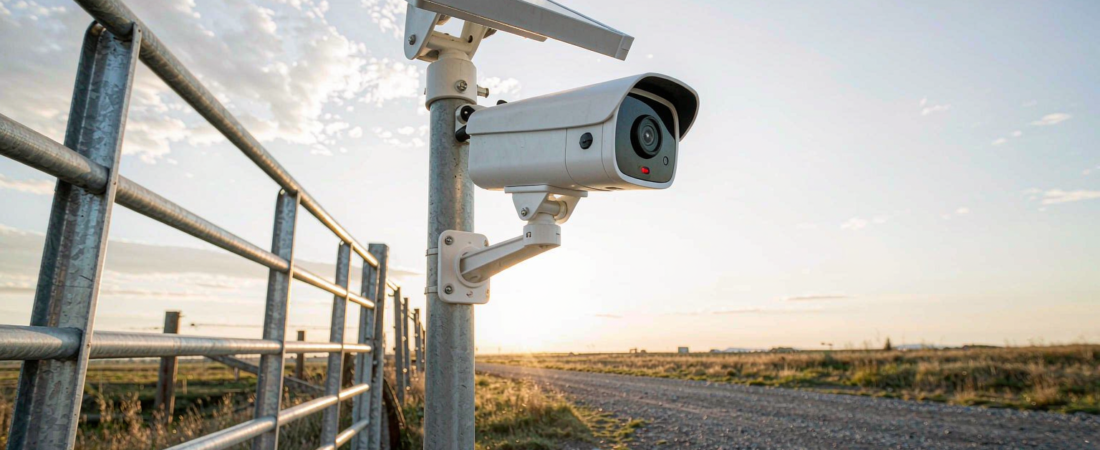
Yes — a security camera without internet can absolutely protect a property. It records video onto local storage such as a microSD card or an on-site recorder, and if it has a built-in 4G LTE modem it can still send motion alerts and live video to your phone over the cellular network. A security camera without internet is a camera that does not depend on your router or a cloud plan to do its core job.
That distinction matters more than most buyers realize. Barns, farms, construction sites, orchards, cabins, driveways at the edge of a large lot — plenty of real properties have no usable Wi-Fi signal and sometimes no mains power either. This guide walks through how these cameras actually work, which type fits which site, and what to check before you buy.
How Does a Security Camera Work Without Internet?
A security camera has two separate jobs that people often lump together: recording footage and making it available to you. Internet access only affects the second one. Recording happens on the camera itself or on a recorder at the site, so a camera with no network at all can still capture everything its lens sees.
Here is the typical chain for a cellular model:
- Motion triggers the camera. A PIR (passive infrared) sensor detects heat movement — a person, animal or vehicle — instead of recording empty footage around the clock, which saves both battery and storage.
- The camera records locally. Video is written to a microSD card in the camera or to a local recorder on site. Nothing is uploaded, so no cloud plan is involved.
- The 4G LTE modem handles the network part. Instead of your router, the camera uses the same cellular network as your phone. With a standard data SIM installed, it can push motion alerts and let you open a live view from the app.
- Power comes from batteries or solar. Models like the woCyber 4G LTE Solar Camera pair a rechargeable battery with a solar panel, so a pole on a far fence line can run without any cable back to a building.
If the camera is a pure offline model — no SIM, no Wi-Fi, just an SD card — then step three simply never happens: you review footage by pulling the card or connecting on site. That is fine for a vacation cottage you visit regularly, but frustrating if you want to know what is happening right now.
4G LTE vs Wi-Fi vs Offline-Only: Which Setup Fits Your Site?
There are three realistic ways to run a security camera without internet, and they suit different situations:
| 4G LTE cellular camera | Wi-Fi camera | Offline SD-card camera | |
|---|---|---|---|
| Needs your router? | No — uses cellular network | Yes | No |
| Live view on your phone? | Yes, over 4G | Yes, over Wi-Fi/internet | No — check the card on site |
| Where footage lives | Local card / local recorder | Often a cloud plan, or local card | Local card only |
| Monthly cloud fee | None for storage | Frequently required for clips | None |
| Needs mains power? | No on solar/battery models | Usually yes, or short battery runs | Battery models exist |
| Best fit | Farms, sites, gates, new builds | Homes with existing Wi-Fi | Cabins, sheds, temp setups |
For buyers comparing the two cellular-friendly routes, the practical difference is remote access. The woCyber F11A-D 4G LTE camera and the compact F6 model are built exactly for this middle ground: no Wi-Fi required, local recording by default, and live view plus PIR motion alerts over the cellular network when you want them.
What Can You Still Do Remotely with a 4G Camera?
This is usually the deciding question for buyers: “if there is no internet at the site, what do I actually get on my phone?” With a 4G LTE camera and an active data SIM, quite a lot:
- Live view on demand — open the app and look at the camera’s feed in real time, from anywhere with phone signal on your end.
- Instant motion alerts — the PIR sensor sends a push notification with a clip or snapshot when something moves in the detection zone.
- Two-way audio — on models that include a mic and speaker, you can speak through the camera, which is genuinely useful for telling a delivery driver where to leave a pallet.
- Remote playback of recent events — clips stored on the local card can be pulled up in the app without driving to the site.
What you give up compared to a cloud camera: no off-site backup if the camera itself is taken, and if the cellular signal at the spot is weak, alerts and live view will be slower or intermittent. That is why we tell every buyer to check signal strength at the exact mounting point first — walk there with your phone and look at the bars.
Related solution
woCyber Solar & 4G Cameras
Solar charging plus 4G LTE for sites with no mains power and no Wi-Fi — recording to local storage instead of a cloud plan.
Where Do Security Cameras Without Internet Make Sense?
Across the applications and client projects we work with, the same site profiles come up again and again:
- Farms and orchards — long fence lines, no buildings nearby, equipment and fuel stored in the open.
- Construction sites — power is temporary, cabling gets stolen with the copper, and the site moves every few months.
- Cabins and vacation homes — visited occasionally, no broadband, and the owner wants to see snow damage or trespassers between trips.
- Gates, driveways and rural yards — Wi-Fi reaches the porch but never the second gate 200 meters away.
In all of these, the pattern is the same: pulling cable or extending internet to the camera spot costs far more than choosing a camera that never needed it in the first place.
Which Security Camera Without Internet Should You Choose?
If you have read this far, you are probably choosing between models. Rather than chasing the highest resolution number on a box, work through this checklist — it is the same one we use when matching a camera to a site:
- Resolution that matches the distance — 4MP or 2K class sensors are the practical sweet spot for identifying people and vehicles at gate and yard distances without ballooning storage use.
- Weather rating — an IP65-rated housing handles rain and dust for outdoor mounting; anything less will let you down in the first storm season.
- Detection quality, not just recording — a PIR sensor that triggers on heat signature means alerts are about the deer and the delivery, not every swaying branch.
- Power plan for the location — solar panel orientation matters on a shaded north-facing wall; a straight battery model may suit a temporary deployment better.
- Storage you control — footage on a local card or local recorder means pay once, own forever: no monthly fee, and no one can lock your clips behind a subscription.
Both the F11A-D and the F6 were designed around this checklist for no-Wi-Fi sites. If your property does have internet in one building, there is a second route worth knowing: keep cellular cameras outdoors where cabling is impossible, and add a NAS security kit indoors so every camera — Wi-Fi or 4G — records to storage you own instead of a cloud plan.
Can a security camera without internet record continuously?
Most battery-powered models record in short clips when the PIR sensor fires, which stretches battery life and keeps the local card readable. Continuous 24/7 recording is better suited to cameras with constant power recording to a local recorder. Match the recording mode to how the site is actually used — an active yard needs motion clips with instant alerts, while an empty seasonal property can be covered with longer pre-record buffers.
Does a 4G security camera need a SIM card and a data plan?
Yes — a 4G LTE camera needs a standard data SIM from a mobile carrier, and that data plan is separate from anything the camera maker sells. The important distinction: the carrier SIM carries the alerts and live view traffic, while the footage itself is stored on the camera’s local storage with no cloud subscription attached. If you only need footage review on site and no remote features, an offline model with a card skips the SIM entirely.
What happens to the footage if the camera is stolen or damaged?
Honest answer: footage stored only inside the camera leaves with the camera. That is the trade-off of local storage in exposed locations, and it is managed the same way professionals manage it — mount the camera high enough to need a ladder, use visible deterrent lighting, and where the site allows, pair the camera with a recorder secured inside a building so the clips exist even if the camera does not.
Is a security camera without internet legal to use on my property?
Recording on your own property for security is permitted in most places, but the details — audio recording, camera direction toward neighbors, signage — vary by country and state. Check your local rules before mounting, and keep the camera aimed inside your own boundary. That is common-sense advice for any camera, internet-connected or not.
Cameras for Sites Without Power or Wi-Fi?
Tell us the site conditions — distance, sunlight, network coverage — and we will match a model.
- Solar-powered cameras
- 4G LTE models for remote sites
- Local storage, no cloud plan
- Business & commercial applications
A typical cloud plan adds up: $10–20/month is $360–$720 over 3 years.
woCyber records on your own hardware for $0/month — one purchase, no plan, no renewal, no price hikes.
✓ What we will never do: no subscription lock-in, no footage uploaded to our servers, no selling your data — your recordings stay on hardware you own.
If you are weighing wire-free hardware for exactly this situation, we walked through a concrete week with the woCyber F1 wire-free battery camera — microSD storage, no cloud plan — in the product notes.